

Every small business starts the same way. A spreadsheet for the rota because it is free. A group chat for swaps because it is instant. A note on the office wall for leave. A second spreadsheet for timesheets at the end of the month.
Each choice is sensible on its own. The cost is not in any of the tools. It is in the gaps between them, and the gaps are where a manager's week disappears.
The short version: the tools are fine. What is missing is a rhythm, so that leave is known before the rota is built, swaps update the rota when they are approved, and timesheets are assembled from records rather than reconstructed from memory.
The work you are actually doing is reconciliation
Look at the questions a manager asks in a normal week.
Did that swap get approved, or did the conversation just stop? Is the rota on the wall the current one? Was Priya on leave on the 14th or absent? Which hours are we paying Jordan for, the scheduled ones or the ones he actually worked? Did payroll get the latest version?
None of those questions are scheduling. They are all reconciliation, and every one exists because a decision was recorded somewhere that does not talk to the place where the decision has consequences.
There is a hard deadline at the end of it, too. Payroll has to be reported to HMRC on or before the day people are paid, so every unresolved question has to be settled by a fixed date whether the records support it or not.
Timesheets are a symptom, not a task
Timesheets get treated as the final admin step of the month. They are not. They are the receipt for decisions made days earlier.
A clean timesheet needs the rota to have been accurate, every swap to have been approved and applied, leave to have been recorded before the week started, attendance to have been captured against shifts, and every correction to carry a reason.
Break any one of those and the timesheet stops being a record and becomes a negotiation, usually held on a Sunday evening between a manager and their own memory. That is why timesheet software only pays off when it is fed by the rest of the workflow rather than typed into by hand.
One loop, not four systems
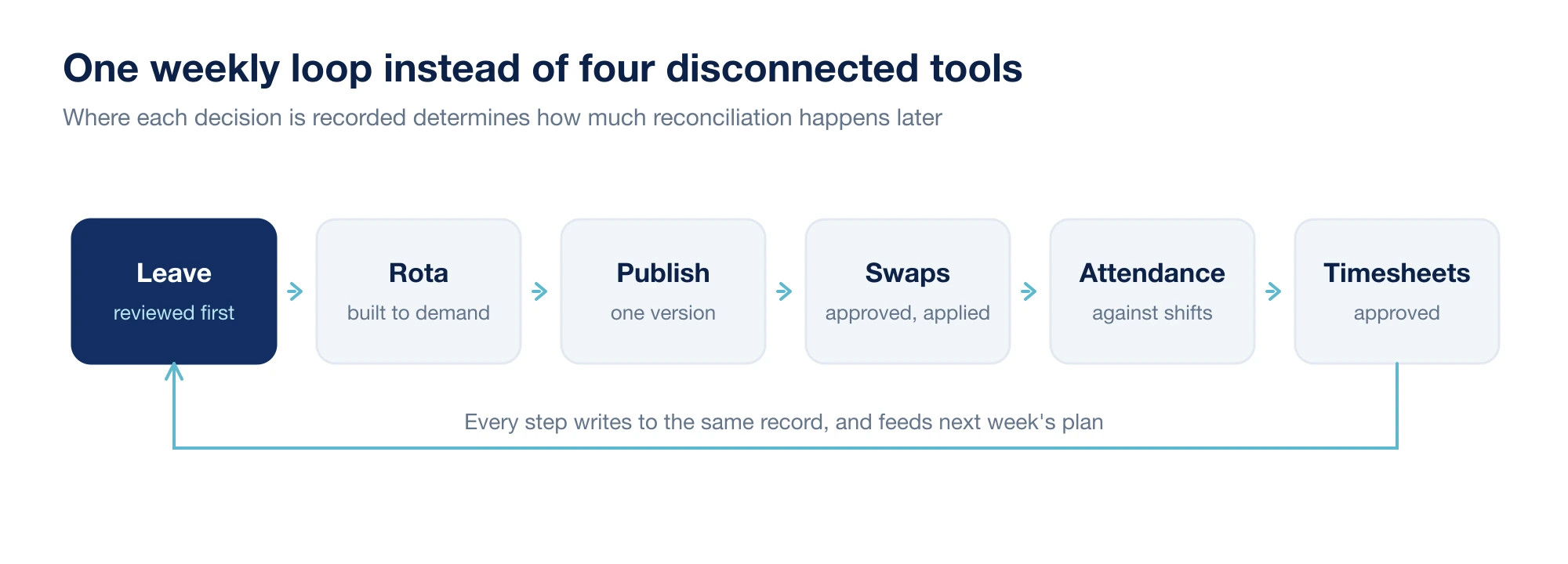
The order matters more than the software. Leave first, because it constrains the rota. Rota next, because it defines what attendance is measured against. Swaps in the middle, because they rewrite the rota. Attendance after that, because it records what actually happened. Timesheets last, because they are the sum of everything before them.
Run those steps out of order and you generate work: a rota built before leave is checked has to be rebuilt, and attendance recorded against a stale rota has to be reinterpreted.
Swaps need to change the record, not just the conversation
Shift swaps are the fastest way for a schedule to drift out of date. Somebody offers a Saturday, somebody accepts, the manager gives a thumbs up eleven hours later, and nothing anywhere is updated.
A swap is properly handled when six things are recorded: who requested it, which shift moved, who took it, who approved it, when the published rota changed, and what each person now sees. The important word is approved. A shift swap app that only forwards messages has moved the chat, not fixed the problem, because the rota, attendance and timesheets are still pointing at the old assignment.
Two rules keep this clean in practice: only a manager can complete a swap, and an approved swap updates the rota automatically rather than by somebody remembering.
Leave has to be visible before you build the week
Leave errors are cheap to prevent and expensive to fix. Scheduling somebody who booked a holiday six weeks ago costs you a shift, a scramble, and a chunk of trust.
The fix is sequencing rather than software: leave is reviewed before the rota is built, not after it is published. A leave management system helps by keeping requests, approvals, dates and balances in one place, and by putting booked absence on the grid while you are still planning, but you get most of the benefit simply by changing the order in which you do things.
Unplanned absence needs the same discipline. The ONS put the UK sickness absence rate at 2.0% of working hours in 2024, about 4.4 days per worker. For a team of ten that is roughly a working week of cover to find every month, which is only a crisis if it is invisible until the morning it happens.
A weekly rhythm you can actually keep
Most of the chaos disappears when the same things happen on the same days. Adjust the days to suit your trading week.
| Day | What happens |
|---|---|
| Monday | Clear last week's attendance exceptions while people still remember |
| Tuesday | Leave and availability requests reviewed and answered |
| Wednesday | Deadline for availability changes affecting the week after next |
| Thursday | Build the rota against demand, with leave already visible |
| Friday | Publish. After this, changes go through approval only |
| Daily | Approve or decline swaps within 24 hours |
| Month end | Review exceptions, then approve timesheets |
The point is not the specific grid. It is that everyone, including your staff, knows what happens when. Predictability removes an enormous number of messages.
What to check before payroll
If the rhythm holds, this is a fifteen minute review rather than an evening:
- Missed clock-outs and any manual attendance corrections, with reasons
- Approved swaps, and confirmation the rota reflects them
- Leave that overlapped scheduled shifts
- Shifts worked that were never scheduled
- Overtime and unusually long shifts
- Anything still pending approval
Anything unexplained here is worth chasing before it becomes a payslip. A correction after payday costs several times what the same question costs beforehand, and it has to be reported to HMRC as an amendment rather than quietly fixed.
Signs the process is too fragile
- Payroll depends on a screenshot somebody took on their phone.
- A manager searches chat history to confirm who agreed to work Saturday.
- Leave gets checked after the rota is written.
- Staff regularly ask which version of the rota is current.
- Monthly totals are calculated by hand.
- Corrections happen with no record of who made them or why.
Individually these are irritations. Together they mean the business has no single source of truth, and every month somebody has to invent one.
The connected workflow checklist
- Leave is reviewed before rota planning begins.
- Rotas are published from one place, on a known day.
- Swaps require manager approval and update the rota on approval.
- Attendance is captured against scheduled shifts.
- Timesheets are generated from attendance rather than retyped.
- Exceptions are visible before approval, not discovered afterwards.
- Staff always see the current version of their own week.
Nothing on that list is ambitious. It is just the difference between running a process and chasing one.
Weekola is built around exactly this loop, so that rota planning, attendance, swaps, leave and timesheets update the same record instead of four different ones.