

Ask most small business owners how they track attendance and the honest answer is a blend: a paper sheet by the till, what the manager remembers, and a message that says "sorry, bus was late, I started at 9:15".
That works until somebody disputes a payslip, or a manager leaves, or HMRC asks you to evidence hours you paid two years ago. Then the informal system turns out to be no system at all.
The short version: tie every clock-in to a scheduled shift, make exceptions visible instead of quietly correcting them, agree break and rounding rules in writing, and review attendance weekly rather than on payroll day.
The small stuff is where the money is
Underpaying the minimum wage is rarely a decision. It is usually an accumulation. The Low Pay Commission estimated around 371,000 workers were paid below the minimum wage in April 2024, and its analysis points at unpaid working time and misunderstood deductions rather than deliberate underpayment.
Ten unrecorded minutes a shift does not feel like a compliance problem. Priced at the April 2026 National Living Wage of £12.71 an hour, across five shifts a week and 46 worked weeks, it is what one person is quietly owed each year.
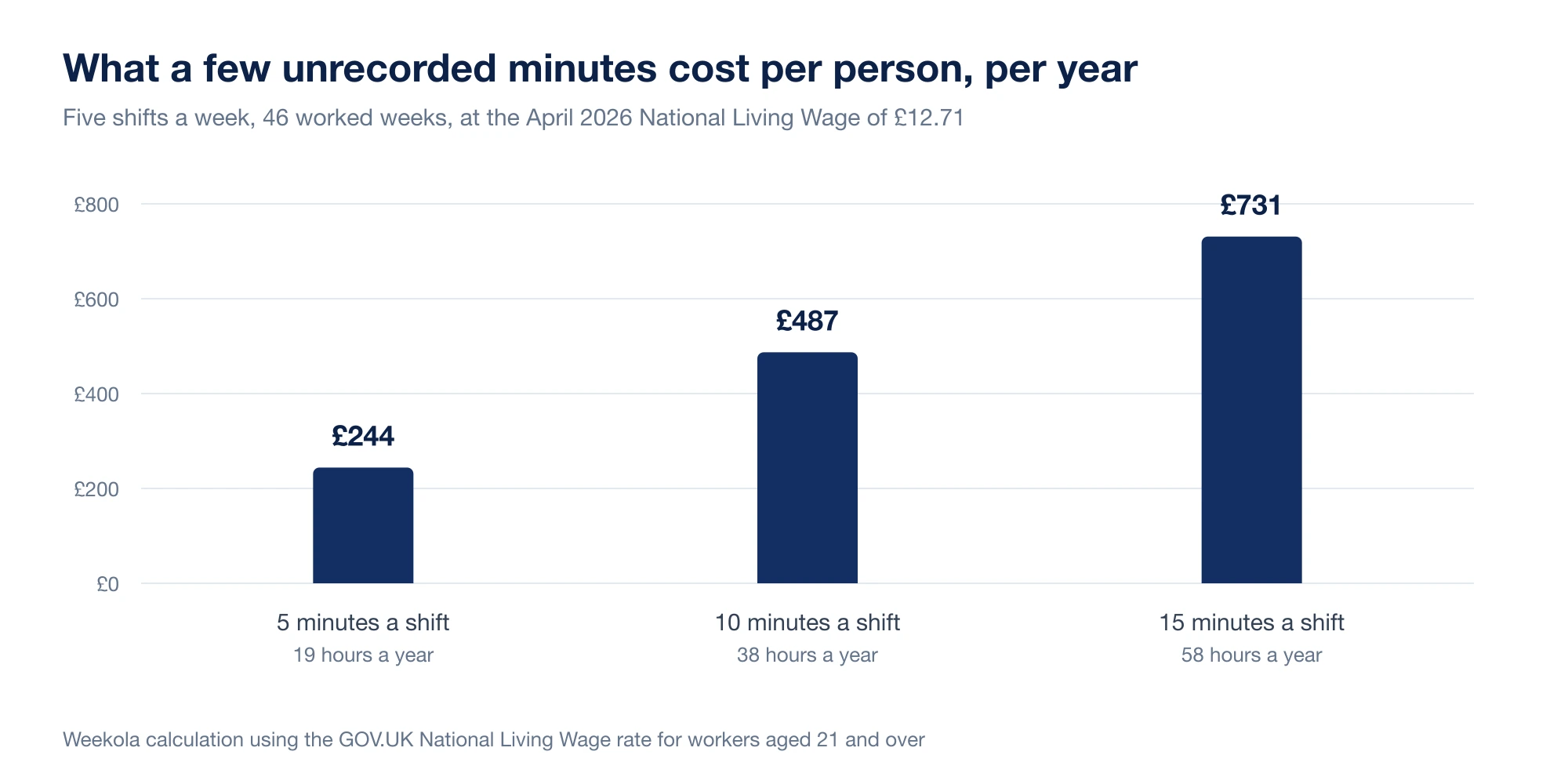
| Unrecorded time | Hours a year | Cost per person | Cost across a team of eight |
|---|---|---|---|
| 5 minutes a shift | 19 hours | £244 | £1,949 |
| 10 minutes a shift | 38 hours | £487 | £3,898 |
| 15 minutes a shift | 58 hours | £731 | £5,846 |
HMRC recovered around £5.8 million in arrears for more than 25,000 workers in 2024 to 2025, and issued 750 penalties totalling £4.2 million. Most of those cases started as a habit, not a policy.
What a decent attendance record has to answer
You do not need enterprise software. You need a record that can answer five questions without anybody thinking hard:
- Who clocked in?
- When did they start and finish, and what break did they take?
- Which scheduled shift was that against?
- Was anything unusual, and who decided what to do about it?
- Is this ready to become a timesheet?
If answering those takes more than a minute per person, the process is quietly costing you a day a month.
Compare clock-ins to the rota, not to nothing
A clock-in on its own is data. A clock-in next to the shift it was meant to cover is information.
Nine o'clock is early if the shift starts at 09:30 and late if it starts at 08:45. Without the comparison you cannot see any of the patterns that matter:
- Repeated late starts on one particular shift, which is often a transport problem rather than an attitude problem
- Early clock-ins that quietly add paid minutes nobody authorised
- Missed clock-outs, which are almost always a process problem
- Shifts worked that were never scheduled
- Someone working a shift they picked up in a swap that never reached the rota
This is why attendance belongs next to rota software rather than in a separate file. The comparison is the whole value.
Make clocking in genuinely easy
Any friction in the clock-in gets paid for later in admin. Staff who are already carrying a tray, a delivery or a customer question will not walk to the back office to press a button.
A clock-in process works when it is fast on a phone, confirms clearly that it worked, is available where people actually start the shift, is tied to the individual rather than a shared sheet, and can be corrected by a manager with a recorded reason.
That last point matters more than it sounds. Corrections are not failures. Corrections without a reason are.
Decide your exception rules before you need them
Every business has exceptions. The difference between a clean process and a messy one is whether the rules were agreed in advance or invented under pressure.
| Exception | Decide in advance | Common failure |
|---|---|---|
| Missed clock-in | Who confirms the start time, and from what evidence | Reconstructed from memory weeks later |
| Missed clock-out | Default to scheduled end, then review | Silently paid to midnight, or not paid at all |
| Early clock-in | Whether early minutes are payable, and above what threshold | Unbudgeted paid time creeping into every shift |
| Late start | When it is logged and when it is a conversation | Noticed only once it is a pattern |
| Unscheduled shift | Who can authorise work outside the rota | Hours appear at payroll with no owner |
| Break not taken | Whether it is paid, and how the rota stops it recurring | Deducted anyway, which is where disputes start |
Write these down in plain language. A short policy everyone knows beats a thorough policy that lives in the owner's head.
With employee attendance tracking these show up as flagged items to review at the end of a shift, rather than as puzzles at the end of a month.
Get breaks and rounding right
Two details cause most UK attendance disputes in small teams.
Breaks. Workers over 18 are entitled to an uninterrupted twenty minute rest break when a shift runs longer than six hours, and it cannot be given at the very start or end of the shift. Under-18s get thirty minutes once they pass four and a half hours. If your system automatically deducts thirty minutes from every long shift, make sure the break was actually taken, and that people are not clocking a break while still serving.
Rounding. Rounding clock times to the nearest quarter of an hour is common and, if it consistently rounds against the worker, risky. Once you strip out unpaid minutes, the hours worked still have to leave people at or above the minimum wage for their age band:
| Rate from 1 April 2026 | Applies to |
|---|---|
| £12.71 | Workers aged 21 and over (National Living Wage) |
| £10.85 | Workers aged 18 to 20 |
| £8.00 | Apprentice rate |
If you round, round symmetrically, and keep the raw times underneath. Employers are expected to keep records capable of showing minimum wage compliance for six years, so a clean attendance history is a business protection rather than just tidiness.
Sick days now cost from day one
From 6 April 2026 Statutory Sick Pay changed: the lower earnings limit and the three waiting days were removed, so more staff qualify and payment starts from the first day of absence.
For a business with part-time and casual staff, that makes accurate absence records worth real money. The ONS put the UK sickness absence rate at 2.0% of working hours in 2024, roughly 4.4 days lost per worker across 148.9 million days. Half-remembered absence dates were survivable when the first three days were unpaid. They are not now.
Explain why the system exists
Attendance tracking lands badly when it arrives with no explanation, because it looks like surveillance. Say what it is for, and be specific.
It means people are paid for what they actually worked, including the extra twenty minutes at the end of a busy Saturday. It means an argument about hours is settled by a record instead of by seniority. It means overtime becomes visible rather than absorbed. And it gives you the pattern data that makes next month's rota less annoying.
Frame it as accuracy, deliver it as accuracy, and it will be accepted as accuracy.
Review weekly, not on payroll day
The single highest-return habit here is a short, regular check rather than one long reconciliation.
- During the shift: who is in, who has not clocked in yet.
- End of shift: clear the exceptions while people are still around to ask.
- Weekly: scan for patterns, missed clock-outs and unscheduled hours.
- Before payroll: approve, do not investigate.
Payroll day should be boring. If it is not, the work is being done in the wrong place.
Turn attendance into timesheets without retyping
Attendance earns its keep when it feeds timesheet software directly, so a manager approves scheduled hours, actual clocked hours, breaks, corrections with reasons and the resulting payable total, all on one screen.
If you are still totalling hours by hand, the payroll hours calculator will at least remove the arithmetic errors while you get the process straight.
A quick self-assessment
Give yourself a point for each of these:
- Staff clock in and out in one consistent place.
- Clock records are matched to scheduled shifts automatically.
- Missed clock-ins and clock-outs are flagged, not silently fixed.
- Corrections carry a reason and a name.
- Break rules are written down and match what actually happens.
- Rounding, if used, is symmetrical and the raw times are kept.
- Attendance feeds timesheets without retyping.
- Exceptions are cleared weekly.
Six or more and payroll should already feel calm. Four or fewer and you are almost certainly paying for the gap in admin time, in payroll corrections, or in goodwill.
Weekola keeps the schedule, the clock records and the payable hours in one place, so the end of the month is a review rather than an investigation.